Introduction
Note
Find the introductory slides here.
Warning
The video only introduces the electricity-only part of PyPSA-Eur.
Workflow
The generation of the model is controlled by the open workflow management system
Snakemake. In a nutshell, the Snakefile
declares for each script in the scripts directory a rule which describes
which files the scripts consume and produce (their corresponding input and
output files). The snakemake tool then runs the scripts in the correct order
according to the rules' input and output dependencies. Moreover, snakemake
will track what parts of the workflow have to be regenerated when files or
scripts were modified.
For instance, an invocation to
$ snakemake -call results/test-elec/networks/solved_2050.nc --configfile config/test/config.electricity.yaml
follows this dependency graph
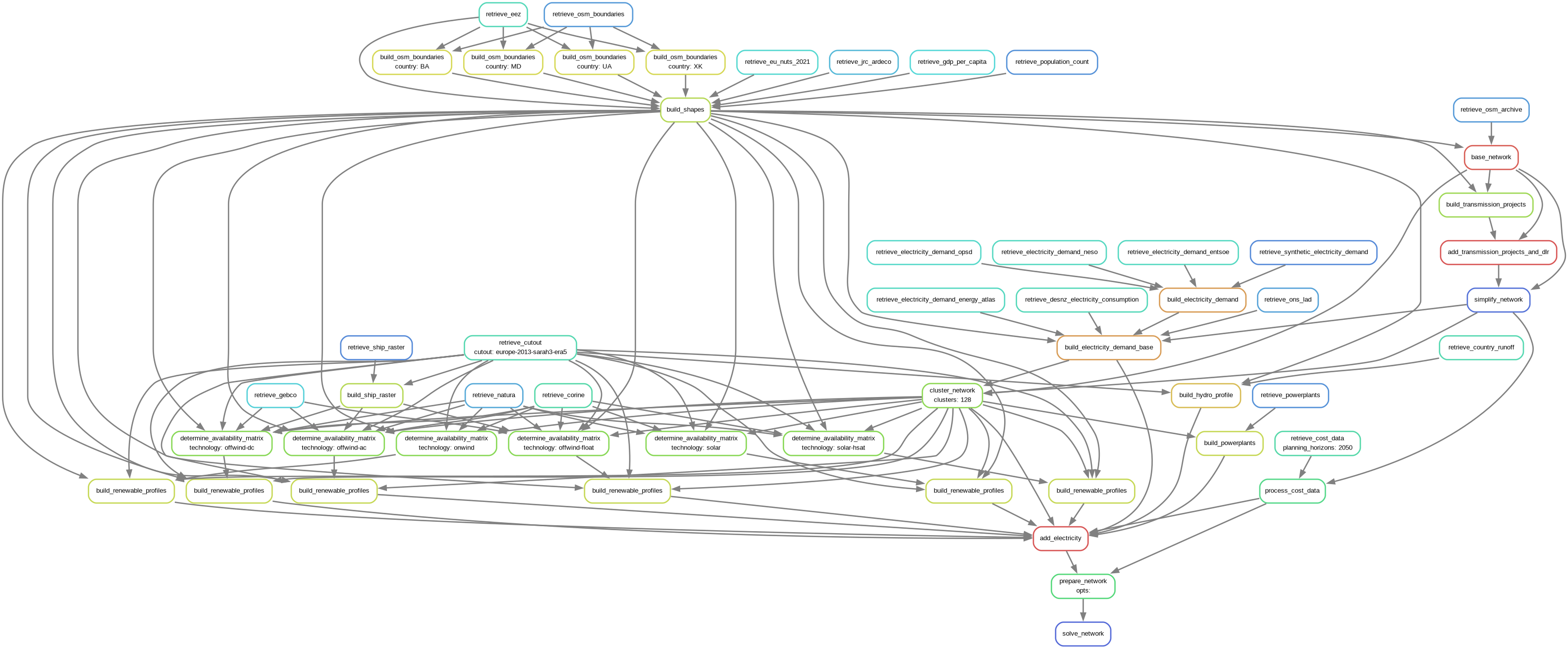
to solve an electricity system model.
The blocks represent the individual rules which are required to create the file referenced in the command above. The arrows indicate the outputs from preceding rules which another rule takes as input data.
Note
The dependency graph can be regenerated using
pixi run snakemake --dag dot --forceall results/test-elec/networks/solved_2050.nc --configfile config/test/config.electricity.yaml | sed -n "/digraph/,/}/p" | pixi run dot -Tsvg -o doc/img/intro-workflow.svg
For the use of snakemake, it makes sense to familiarize yourself quickly
with the basic tutorial and then
read carefully through the documentation of the command line interface, noting the
arguments -j, -c, -f, -F, -n, -r, --dag and -t
in particular.
Collection targets
Besides requesting individual files, you can run whole stages of the workflow
with the collection rules defined in rules/collect.smk:
cluster_networks: buildsresources/{run}/networks/clustered.ncand the busmap.compose_networks: buildsresources/{run}/networks/composed_{horizon}.ncfor all planning horizons.solve_networks: solves all planning horizons; this is the default target.solve_operations_networks: runs the operational dispatch of the solved networks.plot_power_networks,plot_balance_maps,plot_balance_maps_static,plot_balance_maps_interactive: create the corresponding maps.process_costs: prepares the cost assumptions for all planning horizons.
All of them cover every run listed under run: name:, for example
snakemake -call solve_networks.
Scenarios, Configuration and Modification
PyPSA-Eur can be used to run multiple scenarios. Each scenario is a set of
configuration overrides defined in config/scenarios.yaml and enabled via
run.scenarios.enable. The scenario name then appears as the {run}
wildcard
in the resources/ and results/ paths. Further wildcards, such as the
planning {horizon}, are explained in Wildcards; scenarios in
Scenarios.
The model also has several further configuration options collected in the
config/config.default.yaml file located in the root directory, which can be
handled with another scenario management. Options are explained in
Configuration.
Folder Structure
scripts: Includes all the Python scripts executed by thesnakemakerules.rules: Includes all thesnakemakerules loaded in theSnakefile.envs: Includes optioncondaenvironment specifications to run the workflow (usingpixiinstead is our recommended approach).data: Includes input data that is not produced by anysnakemakerule.cutouts: Stores raw weather data cutouts fromatlite.resources: Stores intermediate results of the workflow which can be picked up again by subsequent rules.results: Stores the solved PyPSA network data, summary files and plots.logs: Stores log files.benchmarks: Storessnakemakebenchmarks.doc: Includes the documentation of PyPSA-Eur.docker: Includes some optional Docker environments.
System Requirements
Building the model with the scripts in this repository runs on a regular computer. But optimising for investment and operation decisions across many scenarios requires a strong interior-point solver like Gurobi or CPLEX with more memory. Open-source solvers like HiGHS can also be used for smaller problems.